KingCapture KingCapture
Hardwareversnelling voor ultrasnelle, kristalheldere resultaten.
Beeldopname + Tekstherkenning + Video-opname
Volledig gratis · Ultrasnel · Hoge prestaties
BinnenkortBeeldopname
Volledig scherm · Gebied · Venster · Besturingselement · Scrollen · Webpagina · OCR — 7 modi.
Video-opname
H.264 hoge kwaliteit + GIF. 4K 30fps · Nauwkeurige A/V-lipsynchronisatie.
Hardwareversnelling
GPU-versnelde codering minimaliseert CPU-belasting. Soepele opname, zelfs op lichte hardware.
Tekstherkenning (OCR)
Samenvoeging van 3 engines voor toonaangevende nauwkeurigheid. Google Lens-stijl overlay.
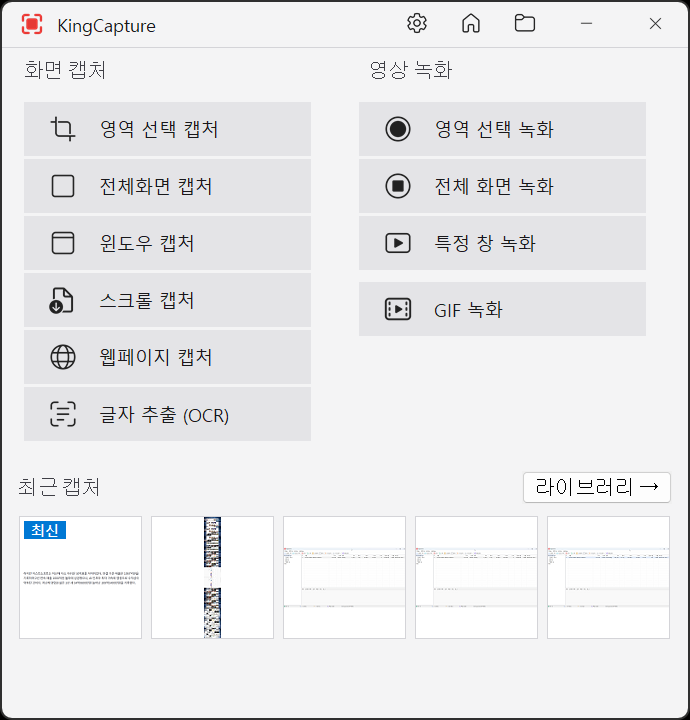
Veelzijdige opnamemodi
- Fullscreen — all monitors or a specific monitor
- Region — precise drag selection (loupe + pixel grid)
- Window — auto-detect, single click
- Control — capture individual buttons/menus
- Scroll — capture long pages in one shot
- Webpagina - Browser-gebaseerde URL-opname
- OCR — extract text directly from screen
Recording Engine
- H.264 video recording / HW acceleration
- GIF recording / auto palette optimization
- Accurate A/V lip-sync / 4K support

OCR Overlay
- Select a region → text regions shown directly on screen
- Ctrl+C copy / drag-and-drop / translation integration
- 3-engine merge provides top-tier Korean accuracy

Geavanceerde functies
- 4K / 5K / gemengde DPI · multi-monitor · Per-Monitor V2
- 12 globale sneltoetsen · automatische conflictdetectie · aanpasbaar
- Tab-gebaseerde UX · miniaturen · donker/licht thema
Summary
| OCR | 3-engine merge, industry-leading Korean accuracy |
| Interface | 94 languages, dark/light theme |
| Install | ~2MB, completely free |
System Requirements
OS
Windows 10 1607 or later
RAM
200MB+ recommended (1GB for 4K recording)
Disk
10MB install + capture storage
License
Freeware (completely free)
Frequently Asked Questions
Yes. No ads, no watermark, no time limit. Free for personal and commercial use.
PNG / JPG / BMP / WebP. Auto-conversion after capture.
Yes. HW-accelerated encoding supports 4K@30fps. Higher FPS depends on GPU.
Major world languages. Korean accuracy is industry-leading.
Supported Formats
- Image save — PNG / JPG / BMP / WebP
- Video save — MP4 (H.264) / GIF
- OCR input — PNG / JPG / BMP